
Data Consistency Overview
GenRocket IPM ensures data consistency within a table, across tables in the same database, and even across multiple databases. It achieves this through a combination of approaches known as mapping and bucketing. This article discussed these two concepts.
In This Article
In-Place Masking (IPM) Mapping
Because IPM relies on SDR to mask values within a given table column, it may need to map the synthetically generated value to the original value to ensure data consistency across multiple table columns within a single database and across various databases in a heterogeneous environment. Thus, GenRocket’s IPM solution employs three different mapping approaches depending on the mapping solution that is required:
Mapping Dependencies
The following items are required for mapping use cases when using IPM:
| Dependency | Description |
| SFTP Server | Required for Mapping (PutMap and GetMap) use cases. The SFTP Server stores key/value pairs in an encrypted or plain text file within the customer environment behind the firewall so that key/value pairs can be stored and retrieved for mapping use cases. |
| SFTP Properties File | Required for the SFTP Server. The location and name of the file are provided within the IPM Configuration. GenRocket uses the file location and the parameter information within the file to know where to store and look for key/value files needed by mapping use cases. This file contains specific parameters. More information will be provided from our support team. |
| Encryption Configuration File | Optional for additional security. This is because the file that will be loaded from the SFTP server contains the sensitive data.
|
Note: This SFTP Server and Encryption Configuration File information is managed from the IPM Config tab within the IPM Configuration in the GenRocket Web Platform.

IPM Column Mapping Options
IPM uses mapping tables, which are tables that store key-value pairs, to ensure data consistency across tables and databases. A key is the original data value, and its masked equivalent is the value. The masked value can be retrieved and used when the key matches, ensuring that IPM inserts the same value for the equivalent original value into each relevant database table column.
Two selectable matching options are available for each column within the IPM configuration:
- isGetMap - Retrieve values from a mapped table using key-value pairs.
- isPutMap - Place new key-value pairs into a mapping table for future use.
These options are available for each column in the IPM Configuration, accessible through G-Subset.
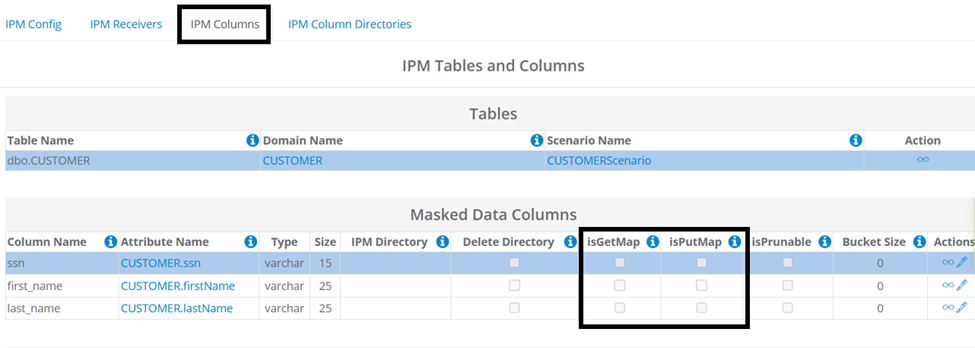
Note: When neither mapping option is selected (enabled) for a column, it is referred to as 'NoMap', meaning values will neither be stored nor retrieved from the mapping table. NoMap scenarios do not require an SFTP Server.
IPM Mapping Example
For example, a user needs to mask an SSN value across two related tables in the same database. The customer table contains an ssn column, and a related table contains a customer_ssn column. The SSN values must remain consistent across both tables to maintain referential integrity. Mapping ensures this value remains consistent when masking the original value in each column of each table.
Let’s say you have a customer and want to ensure that the same synthetic ssn is used each time the real, sensitive value is encountered (whether in a related table in the same database or another database table). This is accomplished by IPM through mapping (PutMap and GetMap). In order to do so, the user must perform a few preliminary steps including configuring database permissions, setting up their IPM Project, and importing their table schema.
Once everything is set up, the user will be able to select the required options within the IPM Configuration for each table column and will need to select the following in the Masked Data columns section:
- customer table > ssn column - isPutMap (key/value pairs saved in file on SFTP Server)
- related table > customer_ssn column - isGetMap (key/value pairs loaded from SFTP Server and used to mask this column)
The values used to mask the customer table's ssn column will be placed in the mapping table as a key/value pair and retrieved by other columns with the same key value. For the customer_ssn column, IPM will get (retrieve) the synthetic values based on the key value so that the same synthetic data values are also used to mask the customer_ssn column.
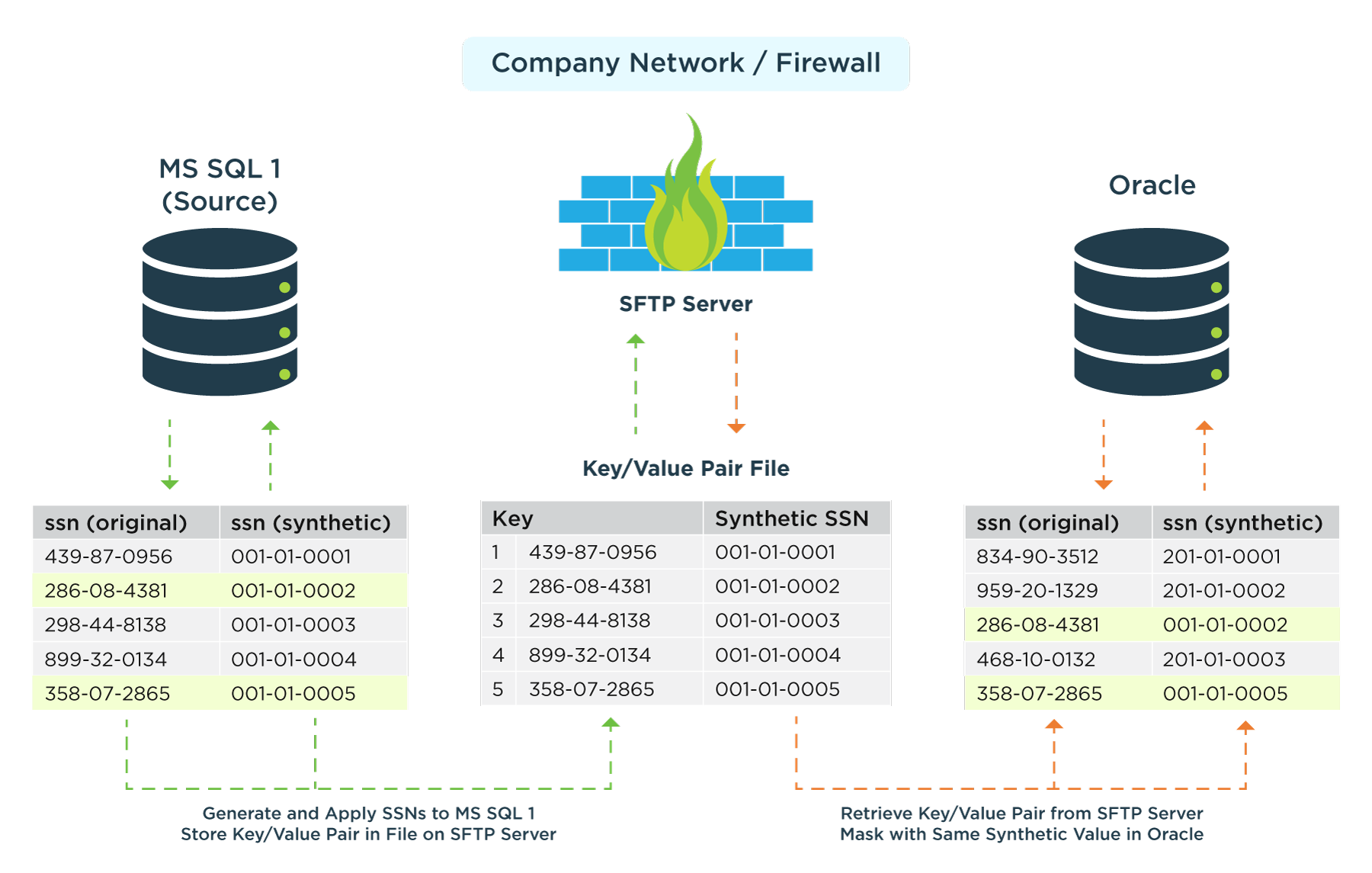
Note: If the columns exist in different databases, then a separate IPM project will be needed for each source database, and the options will be selected for the appropriate table within the IPM configuration for each Project.
In-Place Masking (IPM) Bucketing
GenRocket’s IPM Solution utilizes Bucketing algorithms to ensure data consistency and completeness during the IPM process by maintaining a bucket table that stores a configurable number of synthetic values. A bucket value is consumed when an original value cannot be matched to a synthetic value within a map generated from a previous IPM process. GenRocket’s IPM Bucketing approach provides an effective strategy that decentralizes dependency, improves scalability, and ensures deterministic masking across environments for multiple scenarios.
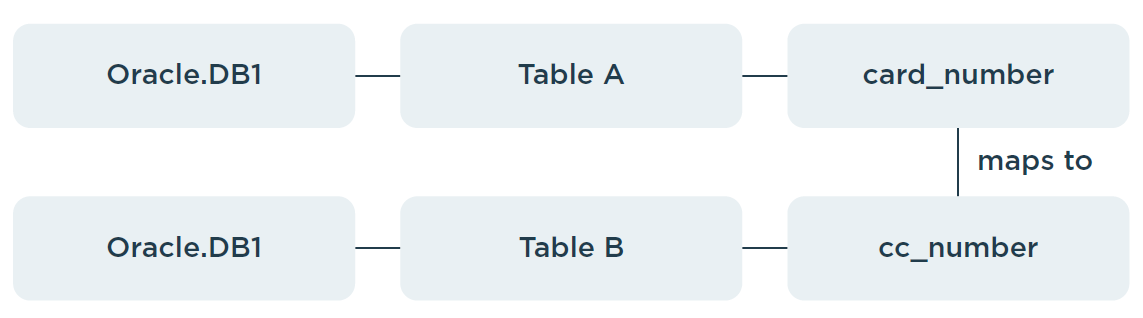
Scenario 1 - Tables are in the same database
Data values in a column within table B must be mapped to values within table A.
- Table A → Database DB-1 (Oracle)
- Table B → Database DB-1 (Oracle)
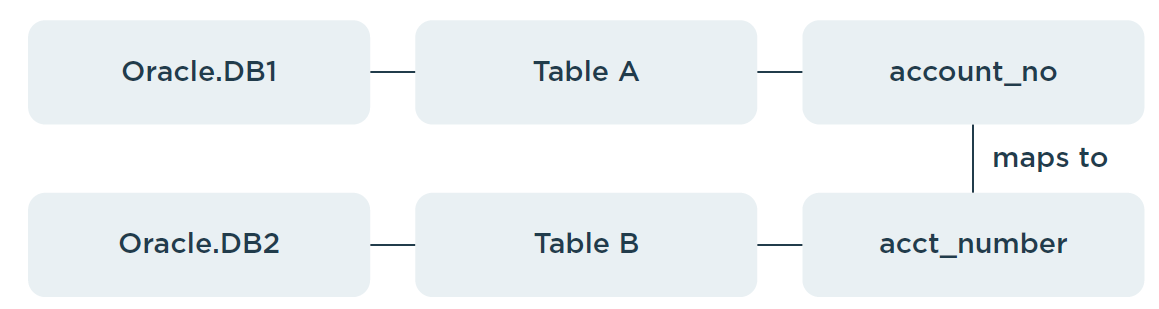
Scenario 2 - Tables in different databases (same database type)
Data values in a column within Database DB-2, table B, must be mapped to values within Database DB-1, table A.
- Table A → Database DB-1 (Oracle)
- Table B → Database DB-2 (Oracle)
Scenario 3 - Tables in different databases (different database types)
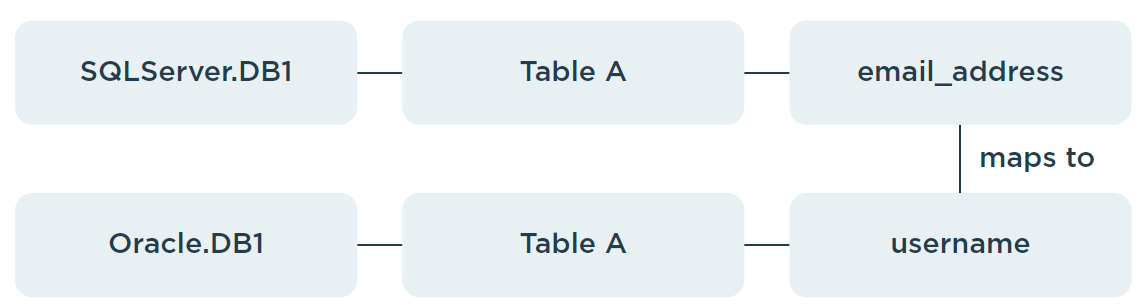
This scenario is similar to Scenario 2, except that the database types differ.
Table A → Database DB-1 (SQL Server)
Table B → Database DB-2 (Oracle)
Benefits of Bucketing
- Decentralized Consistency Management - ensures that each database can independently manage its own bucket table, reducing dependency on a shared central schema. This enhances fault isolation and prevents cross-database contention.
- Improved Scalability - reduces locking and synchronization overhead that would otherwise occur when multiple databases share a single control schema.
- Simplified Data Consistency Handling - ensures consistent masking for records lacking mapped values in a source by utilizing pre-generated synthetic values stored in a bucket, maintaining deterministic results across runs without requiring centralized coordination.
- Reduced Cross-Database Complexity - works seamlessly even when databases of different types (e.g., Oracle, SQL Server) are utilized, eliminating the need for a shared cross-platform metadata schema or distributed transactions.
- Better Performance and Resource Utilization - eliminates the performance bottlenecks of a central database, allowing distributed servers to process independently and optimizing CPU and memory usage.
Limitations of Bucketing
While GenRocket’s Bucketing approach offers significant architectural and performance benefits for SDR, it requires that tables with related columns, which must be mapped and bucketed for referential integrity, not be run in parallel with GenRocket’s horizontal solution. This is necessary to ensure records are mapped and masked in a consistent and deterministic order, preventing data conflicts. Although this is a minor limitation, many tables can be masked in parallel using GenRocket’s Horizontal Scaling solution when mapping and bucketing are not required.
What's Next / How to Get Help
In-Place Masking (IPM) requires specific setup steps, including database permissions that require additional assistance. Please reach out to us at support@genrocket.com, and our team will provide everything you need to begin using this feature.