
What is a Prunable Column?
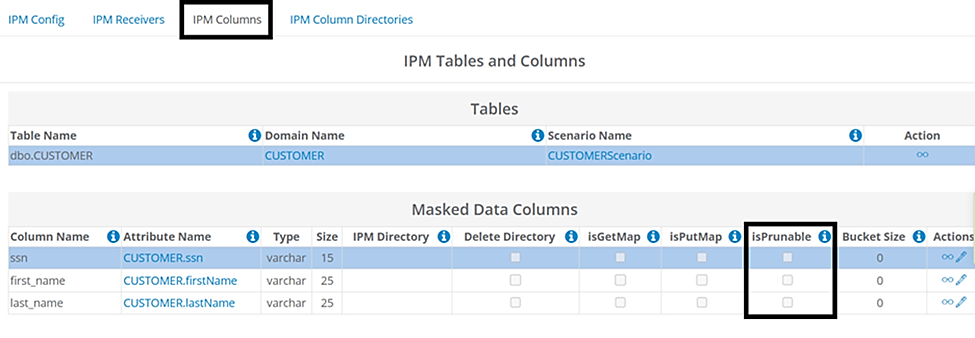
A Prunable Column is a column that holds duplicate values for specific keys, which must be reduced ("pruned") to just one value. Each IPM column within the configuration includes an isPrunable option that users can enable to prune duplicate values. This option can be used to ensure data consistency and referential integrity.
When enabled, duplicate values are eliminated during the masking process so that every matching value for that key gets masked with the same generated (synthetic) value. This option ensures data consistency within the table it is enabled for and any other table where the value will also be masked.
In This Article
- When Should isPrunable be Enabled?
- Example 1 - isPrunable Enabled for Duplicate First Names
- Example 2 - isPrunable Disabled for Duplicate First Names
- What's Next / How to Get Help
When Should isPrunable be Enabled?
- Non-Unique Columns- Allows for duplicate values across different rows within the table.
- The isPrunable option can be enabled to ensure the same synthetic value is used each time the same value is encountered in the table column for data consistency.
- Example columns: first_name, last_name, date_of_birth, and street address.
- Unique Columns - Constraints are set on these tables so that each row must have a unique value and no duplicates are allowed.
- The isPrunable option is not required because there are no unique values.
- Example columns: Any table could be set as unique in a database. Common tables are ssn or email address.
- These columns could also be set up as non-unique in a database and have duplicate values. For example, an ssn is duplicated in a column.
Example 1 - isPrunable Enabled for Duplicate First Names
A user needs to mask a first_name column in a customer table. It contains duplicate records where the same first name appears in more than one record. The column values are non-unique, meaning that duplicate values are allowed. So the same first name could appear multiple times.
When enabled, the same synthetic value will be used in place of the original first name each time it is encountered in the column. The table below illustrates the masking behavior when this isPrunable is enabled:
Original Value | Synthetic Value |
April | Charlotte |
Sherry | Kristy |
Jim | Mark |
Steve | Harrison |
April | Charlotte |
Example 2 - isPrunable Disabled for Duplicate First Names
As with Example 1 above, a user needs to mask a first_name column in a customer table. It contains duplicate records where the same first name appears in more than one record.
When disabled, a different synthetic value will be used each time the original first name is encountered in the column. The table below illustrates this masking behavior when isPrunable is disabled.
Original Value | Synthetic Value |
April | Charlotte |
Sherry | Kristy |
Jim | Mark |
Steve | Harrison |
April | Susan |
What's Next / How to Get Help
In-Place Masking (IPM) requires specific setup steps, including database permissions that require additional assistance. Please reach out to us at support@genrocket.com, and our team will provide everything you need to begin using this feature.