
What is In-Place Masking (IPM)?
In-Place-masking (IPM), also known as in-database masking, is the direct replacement of sensitive data within a database with masked or obfuscated values without creating a separate copy of the data.
GenRocket's In-Place Masking (IPM) feature uses Synthetic Data Replacement (SDR) to replace sensitive data (such as Names, SSNs, or Credit Card Numbers) with synthetic values directly in the source database, eliminating the need for masked copies and ensuring sensitive data protection. IPM provides two modes for masking:
- Single-Table Masking - Mask one or more columns within a single table.
- Multi-Table Masking (Horizontal Scaling) - Mask multiple tables in one or more databases simultaneously.
The image below shows a simple single-table masking example for two table columns within a database. In this example, the lastName and ssn columns in the Customer table are masked with synthetic test data, which is then directly inserted back into the same MS SQL database.
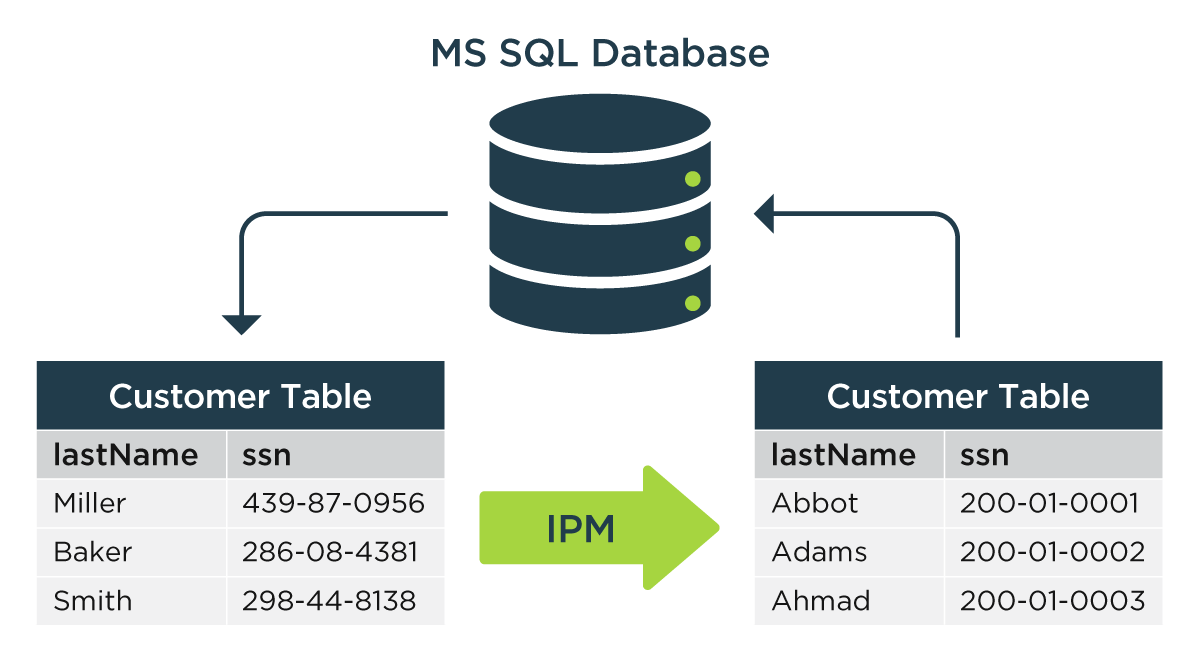
IPM is designed for clients transitioning from the standard TDM process to GenRocket’s fully synthetic test data generation. Therefore, GenRocket’s IPM is suitable for those moving from TDM applications but does not aim to replicate or support all features, such as virtualization, data reservation, and refresh. Instead, it serves as a bridge, enabling integration and interoperability between GenRocket’s synthetic data generation and masking capabilities and other enterprise data management processes.
Note: In-Place Masking differs from Data Subsetting and Masking, which involves copying a data subset to a target database and masking it. For more, see the G-Subset Overview article. Next, let’s review the key benefits of IPM.
In This Article
- IPM Benefits
- IPM Sample Use Cases
- Currently Supported Databases
- System Requirements
- Required GenRocket Components and Features
- IPM Performance Benchmarks
- IPM Best Practices
- IPM Key Features
- How Does Horizontal Scaling Work?
- Additional IPM Articles
- What's Next / How to Get Help
IPM Benefits
- Security - Protects sensitive data without creating duplicate copies.
- Flexibility - Supports single-table and multi-table workflows based on project needs.
- Data Integrity - Maintains full referential integrity across related tables.
- Compliance - Meet privacy laws (GDPR, HIPAA, PCI) with irreversible synthetic replacement.
- Performance - Parallel processing at scale (millions of rows per minute).
- PII Discovery & Automation - Built-in PII discovery and sensitive data detection.
- Reusability - Create a secure, masked "gold copy", which can then be used to create subsets to provision data for other teams.
- Efficiency - Faster turnaround for compliance, testing, and data sharing.
IPM Sample Use Cases
- Compliance & Security – Protect PII/PHI in accordance with GDPR, HIPAA, and PCI.
- Testing & Development – Provide masked production-like data to dev, QA, and UAT environments.
- Legacy Systems - Mask data directly in place when duplicating isn’t practical.
- Data Migration & Integration – Secure data before moving to the cloud or sharing with partners.
- Analytics & Reporting Test Data – Mask sensitive data directly in your database to create secure, realistic test data for analytics, reporting, and machine learning testing requirements..
- Training & Demos – Use safe, realistic data for employee training and customer demonstrations.
Currently Supported Databases
- SQL Server (MS SQL)
- Oracle
- Coming Soon! Support for PostgreSQL, MySQL, MariaDB, DB2, and Snowflake to come in future releases.
System Requirements
- SFTP Server- Required for mapping use cases.
- Note: To learn more about mapping, click here.
- Operating System- Linux Only
- Note: Mac has not been tested by the GenRocket team.
- Note: Mac has not been tested by the GenRocket team.
- Java Runtime Environment Supported Versions - Java 8 (except 1.8u20) ,11, 17, 21, 24
- Minimum Recommended System Specifications:
- 16 CPUs
- 64 GB of RAM
- 1 TB+ of Storage
Required GenRocket Components and Features
The following features are required to use IPM:
- GenRocket Runtime - Required to use the GenRocket engine that is used to generate test data, performing tasks like masking, subsetting, or any other GenRocket functions. Runtime is a set of JAVA Jars downloaded from GenRocket Cloud and installed on a user's local machine, servers, or virtual machines, wherever test data generation is required.
- G-Repository - A set of GenRocket feature components that automatically manage the download, update, deletion, and secure distribution of GenRocket scenarios and configuration files across your corporate environment, behind the firewall, to user machines and test servers.
- XTS - Used to create an XTS file containing the schema details for a database.
- G-Subset - The In-Place Masking (IPM) Engine requires G-Subset to know which data columns require in-place masking for the defined table.
- Data Column Profiling - A GenRocket feature designed to automatically identify Personally Identifiable Information (PII) within your datasets by scanning column headers, not the actual data.
IPM Performance Benchmarks
Are you interested in how IPM performs when speed is important?
If so, take a look at the In-Place Masking (IPM) Performance Benchmarks
IPM Best Practices
Always create a complete copy of your database (a "backup") before applying in-place masking to prevent data loss.
Start small with a single table or in a lower environment first.
Define and enforce masking rules to ensure compliance with relevant regulations.
Use Data Column Profiling to detect all sensitive columns automatically.
One Project = 1 Database
IPM Key Features
GenRocket offers the current IPM capabilities.
Multi-Threaded Processing
The GenRocket IPM solution is optimized for parallel processing by utilizing stored procedures and stored functions that it dynamically generates, tailored to the specific database platform on which it operates. This allows it to process millions of rows of data with maximum performance and efficiency.
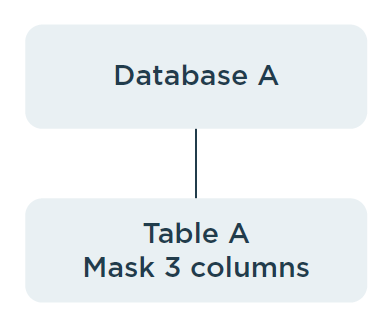
Single Table Masking within a Single Database
Perform IPM on one or more columns within a single table across the entire dataset. For example, mask columns (e.g., date of birth, ssn, name) in a single high-risk table (e.g., customer) for a specific project.
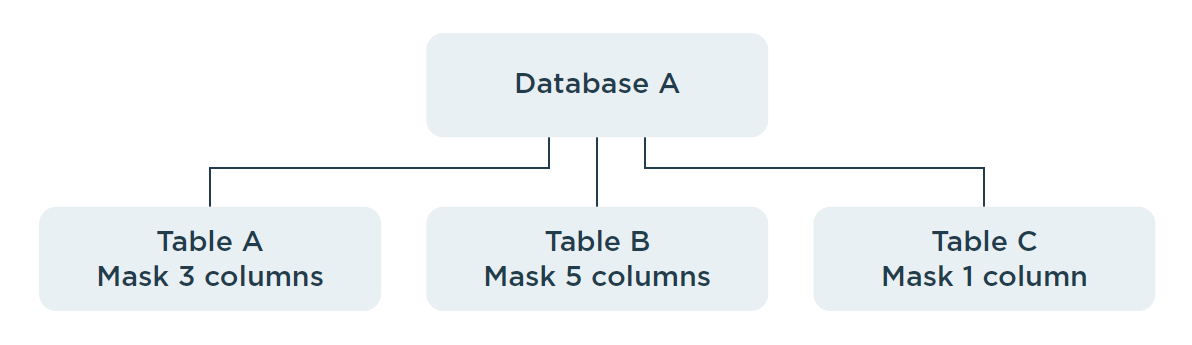
Multi-Table Masking in Parallel within a Single Database
Using GenRocket's IPM Horizontal Scaling feature, IPM can be performed on multiple tables within the same database in parallel and across multiple servers, enabling highly scalable IPM processing. For example, mask multiple tables or an entire schema in parallel before creating a shared testing or analytics environment.
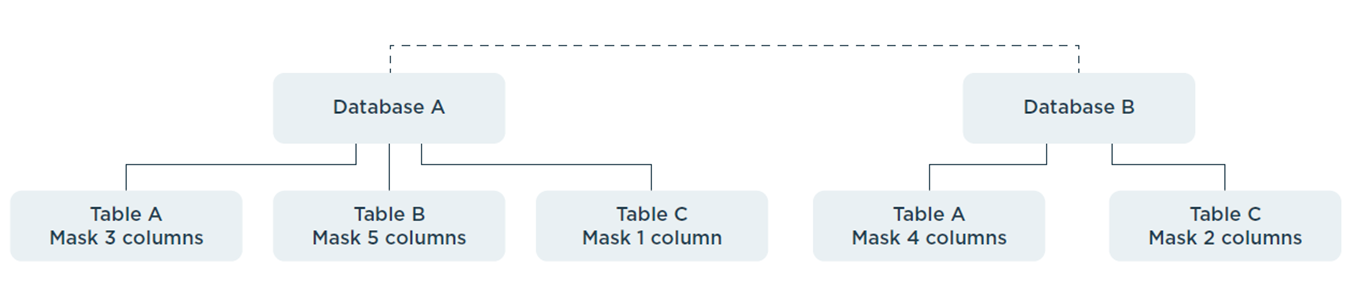
Multi-Table Masking in Parallel across Different Databases
GenRocket’s IPM Horizontal feature can also perform IPM on multiple tables across different databases in parallel, across multiple servers, enabling enterprise-wide IPM processes within heterogeneous environments. A simple example would be masking the name and ssn columns within tables residing in two different databases, where the values must remain consistent across both.
Data Consistency Across Tables and Databases
GenRocket IPM ensures data consistency within a table, across tables in the same database, and even across multiple databases. It achieves this through a combination of approaches known as mapping and bucketing, which are discussed in more detail here.
How Does Horizontal Scaling Work?
Horizontal Scaling allows users to mask multiple tables in the same or different databases in parallel and follows a client-server architecture. It is a scalable option that can mask multiple tables across one or more databases. In contrast, single-table masking is ideal for masking a single table’s columns in a single database.
For Horizontal Scaling, users must initiate an IPM Server and the desired number of IPM Clients to manage in-place masking operations for multiple tables. The setup requires assistance from GenRocket, so this section will only provide a brief overview of the capability.
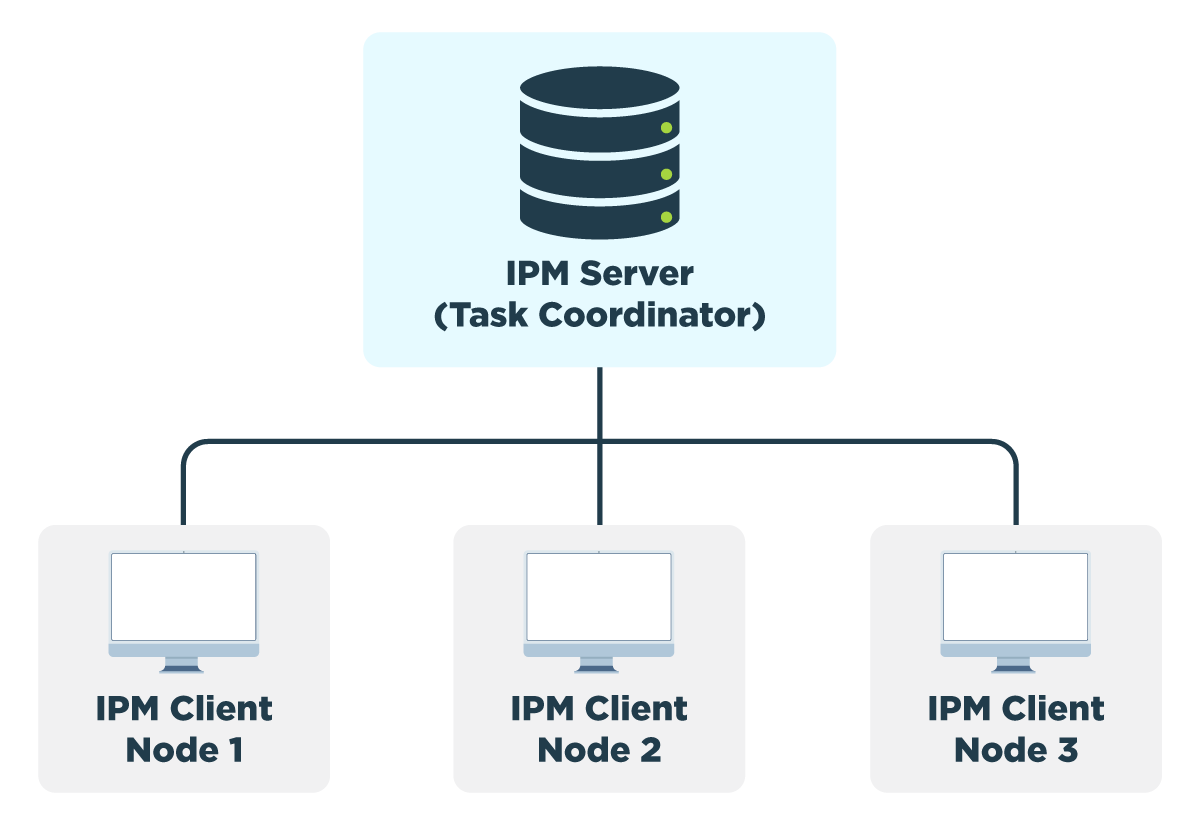
The following terms apply to Horizontal Scaling:
- IPM Server - Orchestrates the distribution and assignment of masking tasks to multiple IPM Clients.
- IPM Client - Executes masking tasks independently. Each IPM Client connects to a database and performs a masking task on a single table. The client executes the tasks in parallel and reports progress back to the IPM Server.
- Task - Perform masking on a single table.
- Logs - Logs for each client will be sent to the Server and can be accessed as needed to view IPM activity.
Note: Both the IPM Server and multiple IPM Clients can run on a single machine for parallel execution of IPM tasks.
Additional IPM Articles
The following articles provide additional information about IPM:
What's Next / How to Get Help
In-Place Masking (IPM) requires specific setup steps, including database permissions that require additional assistance. Please reach out to us at support@genrocket.com, and our team will provide everything you need to begin using this feature.
Note: A new IPM customer must purchase navigator services to set up IPM. During setup, all necessary documents, including permission details and other relevant materials, will be shared directly with the requesting customer.